øAslickproductions.org/forum/index.php?PHPSESSID=5f0fck550j2m4m2fpbtkj2vkm1&topic=1883.msg22749e:/My Web Sites/Slick Productions - FFIV Message Board/slickproductions.org/forum/index467f.htmldelayedslickproductions.org/forum/index.php?PHPSESSID=5f0fck550j2m4m2fpbtkj2vkm1&topic=1883.435e:/My Web Sites/Slick Productions - FFIV Message Board/slickproductions.org/forum/index467f.html.zx?"g^ÿÿÿÿÿÿÿÿÿÿÿÿÿÿÿÿÿÿÿÿÈ P,ÿ½OKtext/htmlISO-8859-1gzip8:Öÿ½ÿÿÿÿÿÿÿÿÑHTue, 10 Mar 2020 05:31:02 GMT0ó°° ®0®P®€§²ð®>"g^ÿÿÿÿÿÿÿÿ`>ÿ½ Grimoire LD's Notes, Patches, and Hacks (Dark Knight/Paladin Swap In Battle!)

Author Topic: Grimoire LD's Notes, Patches, and Hacks (Dark Knight/Paladin Swap In Battle!)  (Read 78680 times)

Grimoire LD

  • FF4 Hacker
  • *
  • Posts: 1,684
    • View Profile
IF you want the event instructions to Skip when a Flag is ON you would use 0x00. (This looks for a mismatch which implies the Flag to Check is Off and to Skip instructions if So)
IF you want the event instructions to skip when a Flag is OFF you would use 0x80. (This looks for a match which implies the Flag to Check is On and to Skip Instructions if So)

A given event flag is "OFF" when it has a value of 0 correct? So when the high bit of the XX parameter is 0 (i.e. we added 0x00 / didn't add anything / just the raw flag number), then the high bit matches when the flag also has a value of 0, meaning it is OFF... right? In the above, you seem to be saying that an OFF flag (0) mismatches a high bit of 0...

Something like that was listed in my example.

"Crash Game 2XX" (2)(Is Event Flag (unused) OFF?)
NPC 1 Face Right (1) (If Not 5  (+1) Skips)
Show Message: (2)"King: You've returned not a moment too soon, Yang. A Dragon in Mt. Hobbs is disrupting our daily training. As our High Monk I ask you to vanquish it."
Show Message: "(2) Yang: You have my word."
Activate Event Flag XX (2) (Unused one from above)
END

What is "2XX" in this example? double XX? can't be.. 0x200 + XX? Also seems like it can't be that either....

Sorry if I'm being bothersome about this, but I need to make sure I fully and correctly understand what's going on before I can code it into the editor...

Alright, now  this patch was made from two fresh ROMs (with the headers removed with the only differences being the new event instruction and a location in the pointer table to the new event instruction.

(1 KB so that seems like it should be the ticket)

The events are no longer messed up. Looks like a success so far! Time to start toying with the new instruction  :childish:

No need to apologize, I'm just rather careless in my explanations, despite writing the matter and it making sense in my head, it seems the explanation on my part is not as adequate as it could be.


Quote
What is "2XX" in this example? double XX? can't be.. 0x200 + XX? Also seems like it can't be that either....

Quite literally it is just an example of an unused Event Flag in the negative range (since 127+ would be the negative range) using decimal base (since the editor normally doesn't deal in hex).

Quote
A given event flag is "OFF" when it has a value of 0 correct? So when the high bit of the XX parameter is 0 (i.e. we added 0x00 / didn't add anything / just the raw flag number), then the high bit matches when the flag also has a value of 0, meaning it is OFF... right? In the above, you seem to be saying that an OFF flag (0) mismatches a high bit of 0...

Close. The OFF flag mismatches purely because the Positive uses a BEQ, which if it reads an Active Event Flag, the "AND" check Cannot return a 00, it will return an amount with a variable causing the routine to end.

This is for Negative

"$00/FDB9   2D FF 06   AND $06FF  [$00:06FF]   A:000C   X:0000   Y:0000   P:envMxdizc - Get rid of all bits not present in 06FF in A.
$00/FDBC   D0 0E   BNE $0E    [$FDCC]   A:000C   X:0000   Y:0000   P:envMxdizc - Branch if Not 00 (Meaning Event Flag is ON, the attempt to match it with an active Event Flag has succeeded.) to rest of Event Instruction skipping routine"

This is for Positive

$00/FDC6   2D FF 06   AND $06FF  [$00:06FF]   A:000C   X:0000   Y:0000   P:envMxdizc - Get rid of all bits not present in 06FF in A.
$00/FDC9   F0 01   BEQ $01    [$FDCC]   A:000C   X:0000   Y:0000   P:envMxdizc - Branch if 00 (Meaning Event Flag is OFF, as the attempt to match it with an active Event Flag has failed and thus will read 00 as none of the bits in 06FF correspond to the bit of the Event Flag so it returns a 00.) to rest of Event Instruction skipping routine.
(A BEQ  without a CMP is always compared to 00 in FFIV)

Is that any clearer?

Pinkpuff

  • Flan Princess
  • *
  • Posts: 924
  • Find a Megalixir in Unprecedented Crisis!
    • View Profile
Not even remotely I'm afraid  :isuck:

How can we be considering event flags in the "negative range" (I assume you mean flags greater than 127) for a parameter to begin with? (a) There are none relevant besides the dark elf attack, (b) there's no way to tell such a flag from it's "positive" counterpart with 0x80 added, and (c) you can't exactly add 0x80 to it...

How about you just fill out this form for me:

Event FlagCurrent ValueXX ParameterSKIP or DO next YY instructions?
05ON0x05____
05ON0x85____
05OFF0x05____
05OFF0x85____
Let's dance!

Grimoire LD

  • FF4 Hacker
  • *
  • Posts: 1,684
    • View Profile
Not even remotely I'm afraid  :isuck:

How can we be considering event flags in the "negative range" (I assume you mean flags greater than 127) for a parameter to begin with? (a) There are none relevant besides the dark elf attack, (b) there's no way to tell such a flag from it's "positive" counterpart with 0x80 added, and (c) you can't exactly add 0x80 to it...

How about you just fill out this form for me:

Event FlagCurrent ValueXX ParameterSKIP or DO next YY instructions?
05ON0x05____
05ON0x85____
05OFF0x05____
05OFF0x85____

Oh! I see where the confusion arises...

Remember when you said..

Quote
Hm, well if that's the only problem (besides the issue of deciphering how to read flag values) I have a very hack-ish solution:

"Do the following action if Flag XX is (on/off)"

Top bit of XX indicates whether you're looking for on or off, the rest indicate the flag number (since it seems all the used flags besides 255 are under 128 ^_^)

And that is what I did. This does not take into account Negative Range Event Flags. My example above used a very high hypothetical Flag 88-125+127, hence why I used the term "2XX". When my routine reads an 80 bit it instead turns it into its positive form for the Event Checking and the negative portion of it is only brought into play later on in the routine for the branching of checking whether an Event Flag is Off/On, I'll fill out that chart though and see if it helps any.

I was using the bit in its negative form in the editor for my experiments in that format, hence why I used the negative form in that manner.

Event FlagCurrent ValueXX ParameterSKIP or DO next YY instructions?
05ON0x05DO
05ON0x85SKIP
05OFF0x05DO
05OFF0x85SKIP

Good idea with the chart though. Hopefully that will make a little sense.

Pinkpuff

  • Flan Princess
  • *
  • Posts: 924
  • Find a Megalixir in Unprecedented Crisis!
    • View Profile
So wait... if XX = 05, then it will DO the next YY instructions, regardless of whether flag 05 is ON or OFF??
Let's dance!

Grimoire LD

  • FF4 Hacker
  • *
  • Posts: 1,684
    • View Profile
So wait... if XX = 05, then it will DO the next YY instructions, regardless of whether flag 05 is ON or OFF??

Ahem... got a bit tripped up there...

Event FlagCurrent ValueXX ParameterSKIP or DO next YY instructions?
05ON0x05DO
05ON0x85SKIP
05OFF0x05SKIP
05OFF0x85DO

This boils my mind because I'm trying to disassociate "success of routine" from "event instructions playing" when I have to remember that when it Skips the instructions it means my routine was successful.


Pinkpuff

  • Flan Princess
  • *
  • Posts: 924
  • Find a Megalixir in Unprecedented Crisis!
    • View Profile
ALRIGHT! I get it now!  :childish:

Thanks, sorry that took so long to sort out.

Also, in case you missed my edit a few posts ago, the patch seems to be executing the instruction that should be the pseudo YY parameter. So like if I say something like:

Visual Effect 05
Placement 1 Moves down
Change character graphic to 1
You face down

Then if it skips, it skips correctly, but if it executes, it will move Placement 1 down (seems like it shouldn't, since that's just the parameter byte and I don't actually want Placement 1 to move down).
Let's dance!

Grimoire LD

  • FF4 Hacker
  • *
  • Posts: 1,684
    • View Profile
ALRIGHT! I get it now!  :childish:

Thanks, sorry that took so long to sort out.

Also, in case you missed my edit a few posts ago, the patch seems to be executing the instruction that should be the pseudo YY parameter. So like if I say something like:

Visual Effect 05
Placement 1 Moves down
Change character graphic to 1
You face down

Then if it skips, it skips correctly, but if it executes, it will move Placement 1 down (seems like it shouldn't, since that's just the parameter byte and I don't actually want Placement 1 to move down).

Oh, was I really so careless that I forgot to include a clause for that? Knowing my shoddy coding, quite likely...

Yeah. I didn't include an exception for that. Truly, how careless of me, I'll fix that as soon as I can.

Grimoire LD

  • FF4 Hacker
  • *
  • Posts: 1,684
    • View Profile
Alright. Here we are, after the routine fails to Skip a routine it now Increments the Event Progress byte to skip the Dummy Movement bit (I had this originally planned, but I must have forgotten about it when I saw that the main concept was working well enough)

Thank you for finding that PinkPuff.


Pinkpuff

  • Flan Princess
  • *
  • Posts: 924
  • Find a Megalixir in Unprecedented Crisis!
    • View Profile
Now it crashes the game...

I tried patching it to a fresh rom and to a rom already patched with the previous patch, in both cases inserting a "Load Graphic" instruction crashed the game. Unheadered in both cases.
Let's dance!

Grimoire LD

  • FF4 Hacker
  • *
  • Posts: 1,684
    • View Profile
Geez! I always make that mistake with IPS patching at least once or twice. I think I used the default ROM as the modified one and the modified rom as the default one. Now it Should work.


Pinkpuff

  • Flan Princess
  • *
  • Posts: 924
  • Find a Megalixir in Unprecedented Crisis!
    • View Profile
SUCCESS!!

Alright now to get it coded into the editor. What bytes are changed by the patch? You don't have to list all of them necessarily, just enough to be sure it's your patch and not some other one someone might do up. This is strictly for the purposes of the editor determining whether the patch has been applied to the rom it's loading.
Let's dance!

Grimoire LD

  • FF4 Hacker
  • *
  • Posts: 1,684
    • View Profile
SUCCESS!!

Alright now to get it coded into the editor. What bytes are changed by the patch? You don't have to list all of them necessarily, just enough to be sure it's your patch and not some other one someone might do up. This is strictly for the purposes of the editor determining whether the patch has been applied to the rom it's loading.

Fantastic! This patch  changes bytes from 7D71 to 7DE1.

In addition 633E is also filled with a pointer rather than 00's.

As always, unheadered.

Grimoire LD

  • FF4 Hacker
  • *
  • Posts: 1,684
    • View Profile
Change Graphic to XX

Code: [Select]
$00/E9B6 20 CB E2 JSR $E2CB  [$00:E2CB] A:00E9 X:0000 Y:0002 P:envMxdiZc - Jump to Subroutine (Load XX Parameter, +1 to X)
~~~~~~~~~~~~~~~~~~~~~~~~~~~~~~~~~~~~~~~~~~~~~~~~~~~~~~~~~~~~~~~~~~~~~~~~~~~~~~~~~~``
$00/E2CB E8 INX A:00E9 X:0000 Y:0002 P:envMxdiZc - +1 to X.
$00/E2CC 86 B3 STX $B3    [$00:06B3] A:00E9 X:0001 Y:0002 P:envMxdizc - Store Event Progress in 06B3.
$00/E2CE BD D5 09 LDA $09D5,x[$00:09D6] A:00E9 X:0001 Y:0002 P:envMxdizc - Load Event Variable into A.
$00/E2D1 60 RTS A:0001 X:0001 Y:0002 P:envMxdizc - Return
~~~~~~~~~~~~~~~~~~~~~~~~~~~~~~~~~~~~~~~~~~~~~~~~~~~~~~~~~~~~~~~~~~~~~~~~~~~~~~~~~~
$00/E9B9 85 06 STA $06    [$00:0606] A:0001 X:0001 Y:0002 P:envMxdizc - Store A (in this case desired Character Graphic) in 0606.
$00/E9BB A2 00 00 LDX #$0000 A:0003 X:0001 Y:0002 P:envMxdizc - Load 0000 into X.
$00/E9BE A0 00 00 LDY #$0000 A:0003 X:0000 Y:0002 P:envMxdiZc - Load 0000 into Y.
$00/E9C1 B9 00 10 LDA $1000,y[$00:1000] A:0003 X:0000 Y:0000 P:envMxdiZc - Load A from 1000+Y
$00/E9C4 29 1F AND #$1F A:0081 X:0000 Y:0000 P:eNvMxdizc - Get rid of bits 20,40,80.
$00/E9C6 C5 06 CMP $06    [$00:0606] A:0001 X:0000 Y:0000 P:envMxdizc - Compare it to the value in the stored Event Variable.
$00/E9C8 F0 11 BEQ $11    [$E9DB] A:0001 X:0000 Y:0000 P:eNvMxdizc - If equal, branch.
----------------------------------------------------------------------------------------------------
$00/E9CA C2 20 REP #$20 A:0001 X:0000 Y:0000 P:eNvMxdizc - Reset Processor Status (16 bit rather than 8 bit, I believe)
$00/E9CC 98 TYA A:0001 X:0000 Y:0000 P:eNvmxdizc - Transfer Y to A.
$00/E9CD 18 CLC A:0000 X:0000 Y:0000 P:envmxdiZc - Clear Carry Flag.
$00/E9CE 69 40 00 ADC #$0040 A:0000 X:0000 Y:0000 P:envmxdiZc - Add 40 onto A.
$00/E9D1 A8 TAY A:0040 X:0000 Y:0000 P:envmxdizc - Transfer A to Y.
$00/E9D2 A9 00 00 LDA #$0000 A:0040 X:0000 Y:0040 P:envmxdizc - Load 0000 into A.
$00/E9D5 E2 20 SEP #$20 A:0000 X:0000 Y:0040 P:envmxdiZc - Set Processor Status
$00/E9D7 E8 INX A:0000 X:0000 Y:0040 P:envMxdiZc - +1 to X.
$00/E9D8 4C C1 E9 JMP $E9C1  [$00:E9C1] A:0000 X:0001 Y:0040 P:envMxdizc - Loop back to E9C1.
-----------------------------------------------------------------------------------------------------
$00/E9DB 8A TXA A:0001 X:0000 Y:0000 P:envMxdiZC - Transfer X to A.
$00/E9DC 8D 03 17 STA $1703  [$00:1703] A:0000 X:0000 Y:0000 P:envMxdiZC - Store A in 1703 (Slot number I believe, not sure what's being done in this case though)
$00/E9DF A9 01 LDA #$01 A:0000 X:0000 Y:0000 P:envMxdiZC - Load 01 into A.
$00/E9E1 85 CC STA $CC    [$00:06CC] A:0001 X:0000 Y:0000 P:envMxdizC - Store A in 06CC.
$00/E9E3 4C D3 E0 JMP $E0D3  [$00:E0D3] A:0001 X:0000 Y:0000 P:envMxdizC - Jump to ?Event Execution?

And that's it... the game makes no actual change to find the character graphic and seems like it will look through All of RAM to find a match, hence why we get some unintended graphics, it would seem. How to fix this though... it's admittedly much shorter than I thought it would be. I can always have it Jump to unused space for my purposes.

What was your suggestion for this one again, PinkPuff?

Pinkpuff

  • Flan Princess
  • *
  • Posts: 924
  • Find a Megalixir in Unprecedented Crisis!
    • View Profile
I retracted my suggestion in favor of the more general branching statement.

But I think if I had to suggest something for this, it would be "Change character graphic to XX even if that actor isn't in your party". That way you can do things like, simulate having the camera follow a different character in a "meanwhile" scene or something. E.g.:

Code: [Select]
Load Tower of Zot Command Center
Change character graphic to (Kain)
You face down
You move down
Show message "Kain: Let me be the one to take out Cecil"
Show message "Golbez: No"
You bow head
You toggle turning
You move up
You toggle turning
Show message "Kain: As you wish"
Load Mount Ordeals 1F
Change character graphic to (DK Cecil)
You face left

I know you can already simulate something like that by making the main character invisible and just moving it around in tandem with the other character, but this way is less clunky and at the very least doesn't irrevokably turn your appearance into a pig or tiny person when you make a mistake. It could also help save NPC placement space. Imagine all the placements you could free up if in the "attack on the giant" sequence you just teleported your main character around, turning him into the various other characters (Yang, Edward, etc). You could even free up entire maps using that technique in combination with activating/deactivating NPCs as you teleport.
Let's dance!

Grimoire LD

  • FF4 Hacker
  • *
  • Posts: 1,684
    • View Profile
 :bah: that 1703 check is really the core of how this routine works. The game simply looks to see which slot should be loaded. It doesn't actually load a sprite in the basic sense at all. I'm afraid that there's no way that I can tell (I'm sure there must be, but it's a bit beyond me) to load a sprite from "Load Character Graphic". But I have had major success in an older idea of mine.

Does anyone recall my old "Commands in RAM" hack? Well it failed because the section of "RAM" I was using, never got saved. It wasn't SRAM so characters were stuck with their default commands, even though they were technically moved in RAM, they were reflected the same in all files. But there's a decent chunk of unused SRAM data at 4A0 right before the names that due to Chillyfeez's Shadow Party hack, I was able to fill with all character's Commands (the commands are actor based and are just 4 Bytes too long before they overflow into Names, meaning that FuSoYa would have four commands based on Cecil's name, a shame.) I *Could* make them based on Character ID, which would take up the same amount of space as they do in this (it would mean that Tellah would not lose Recall *normally* however as this is a hack it is meant to be compatible with some other upcoming hacks.)

Here's the associated data with this hack when entering battle...

Code: [Select]
$03/8B8B BD 01 20 LDA $2001,x[$7E:2001] A:0000 X:0000 Y:0000 P:envMxdIZC - Load A from Class.
$03/8B8E 29 1F AND #$1F A:0081 X:0000 Y:0000 P:eNvMxdIzC - Get rid of all 20,40,80 bits.
$03/8B90 D0 01 BNE $01    [$8B93] A:0001 X:0000 Y:0000 P:envMxdIzC - If not 00, branch.
---------------------------------------------------------------
$03/8B92 EA NOP A:0000 X:0000 Y:0000 P:envMxdIZC
$03/8B93 EA NOP A:0000 X:0000 Y:0000 P:envMxdIZC.
-----------------------------------------------
$03/8B94 85 DF STA $DF    [$00:00DF] A:0000 X:0000 Y:0000 P:envMxdIZC - Store A in DF.
$03/8B96 A9 05 LDA #$05 A:0000 X:0000 Y:0000 P:envMxdIZC - Load Amount of Commands into A.
$03/8B98 85 E1 STA $E1    [$00:00E1] A:0005 X:0000 Y:0000 P:envMxdIzC - Store Amount into E1.
$03/8B9A 20 E0 83 JSR $83E0  [$03:83E0] A:0005 X:0000 Y:0000 P:envMxdIzC - Jump to Subroutine (?)
$03/83E0 64 E0 STZ $E0    [$00:00E0] A:0005 X:0000 Y:0000 P:envMxdIzC - Store Zero in E1.
$03/8B9D A9 05 LDA #$05 A:0000 X:0000 Y:0000 P:envMxdIZc - Load 05 into A.
$03/8B9F 85 AB STA $AB    [$00:00AB] A:0005 X:0000 Y:0000 P:envMxdIzc - Store A in EB.
$03/8BA1 A6 E3 LDX $E3    [$00:00E3] A:0005 X:0000 Y:0000 P:envMxdIzc - Load X from Class Slot.
$03/8BA3 BF A0 14 00 LDA $0014A0,x[$00:14A0] A:0005 X:0000 Y:0000 P:envMxdIZc - Load A from SRAM based Command Location.
$03/8BA7 99 03 33 STA $3303,y[$7E:3303] A:0000 X:0000 Y:0000 P:envMxdIZc - Store A in Battle Commands.

And that's it. Just like that you can put Commands into RAM. Now another important step is getting them into RAM in the first place... I was ignorant way back when in trying to get rid of the initial loading of Dark Knight Cecil, but there should be other room to work with in that start of game section.

I would be safe just tying this process into the first part of a custom event instruction routine, rather than messing with the game start routines.


So... let's get to it!

This is one of my finest works, in my opinion, very simple and very efficient. Making use of another Dummy Movement Bit plan the game can change commands of characters on the fly! (A note, however. This is only intended to work with a certain configuration. Since it looks at Class now rather than Actor, you will want to change the first 13 Actors Commands to the overall Commands of the characters. You won't have to worry about Tellah's Recall since you can easily remove it with this Event Instruction hack).

Replacing Gil -100 XX to Moving the Battle Command Table/Changing Battle Commands by XX to YY.

First Time Using Instruction - These are the instructions that will play the first time the instructions are used it is Imperative that you put this as the first event in the game as this loads the Battle Commands into RAM.

Code: [Select]
$00/E97E A9 00 LDA #$00 A:00E9 X:0000 Y:0002 P:envMxdiZc - Load 00 into A.
$00/E980 CD A1 14 CMP $14A1  [$00:14A1] A:0000 X:0000 Y:0002 P:envMxdiZc - Does the Second Battle Command in RAM read 00 as well? (This would be a second Fight command in Dark Knight Cecil's Commands, as no player would want that, this assumes that the Battle Commands have not been placed in RAM.)
$00/E983 D0 15 BNE $15    [$E99A] A:0000 X:0000 Y:0002 P:envMxdiZC - Branch if it reads anything but 00.
$00/E985 A0 00 00 LDY #$0000 A:0000 X:0000 Y:0002 P:envMxdiZC - Load 0000 into Y.
$00/E988 A2 00 00 LDX #$0000 A:0000 X:0000 Y:0000 P:envMxdiZC - Load 0000 into X.
$00/E98B BF 55 FD 13 LDA $13FD55,x[$13:FD55] A:0000 X:0000 Y:0000 P:envMxdiZC - Load A from ROM Battle Commands.
$00/E98F 99 A0 14 STA $14A0,y[$00:14A0] A:0000 X:0000 Y:0000 P:envMxdiZC - Store A in New Battle Commands RAM Location.
$00/E992 E8 INX A:0000 X:0000 Y:0000 P:envMxdiZC - +1 to X
$00/E993 C8 INY A:0000 X:0001 Y:0000 P:envMxdizC - +1 to Y
$00/E994 C0 41 00 CPY #$0041 A:0000 X:0001 Y:0001 P:envMxdizC - Has it done this 65 times (13 x 5)?
$00/E997 D0 F2 BNE $F2    [$E98B] A:0000 X:0001 Y:0001 P:eNvMxdizc - If not, branch back.
--------------------------------------
$00/E999 60 RTS A:0001 X:0041 Y:0041 P:envMxdiZC - Return

And that's it for getting the Commands into RAM, note that there IS No Dummy Movement Byte for the Initialization!

Now to manipulate them you will need another Dummy Movement Bit in addition to your variable. Your Variable will be the Command you are changing another Command into. Your Dummy Movement byte will be the Slot of the Command you are changing. So for instance if you wanted to get rid of Tellah's Recall and put Item in it's place you would use...

"x50 Gil " - 01 (Item). And realizing that Tellah's commands would fall in the 16-20(Decimal) range you would set the Dummy Movement Bit to 13(Hex) 19(Dec) (NPC 2 Moves Down) - You would use another Event Instruction of x50 Gil set it to FF (Null) and use a Dummy Movement Bit of 14 (Hex) 20 (Dec) (NPC 2 Moves Left)

Once you get the hang of it, while a little cumbersome in the current event setup, it is much better than the alternative, which doesn't exist.

Changing Battle Commands

Code: [Select]
$00/E99A A2 00 00 LDX #$0000 A:0000 X:0000 Y:0002 P:eNvMxdizc - Load 0000 into X.
$00/E99D 20 CB E2 JSR $E2CB  [$00:E2CB] A:0000 X:0000 Y:0002 P:envMxdiZc - Jump to Event Instruction Progress Subroutine
$00/E2CB E8 INX A:0000 X:0000 Y:0002 P:envMxdiZc - +1.
$00/E2CC 86 B3 STX $B3    [$00:06B3] A:0000 X:0001 Y:0002 P:envMxdizc - Store X in Event Instruction Progress.
$00/E2CE BD D5 09 LDA $09D5,x[$00:09D6] A:0000 X:0001 Y:0002 P:envMxdizc - Load Event Variable (Battle Command) into A.
$00/E2D1 60 RTS A:0001 X:0001 Y:0002 P:envMxdizc - Return.
$00/E9A0 48 PHA A:0001 X:0001 Y:0002 P:envMxdizc - Push A onto Stack.
$00/E9A1 AE D3 09 LDX $09D3  [$00:09D3] A:0001 X:0001 Y:0002 P:envMxdizc - Load X from Event Progress (Dummy Movement Bit - Command Slot Location)
$00/E9A4 BF 00 82 12 LDA $128200,x[$12:826B] A:0001 X:006B Y:0002 P:envMxdizc - Load A from next Event Instruction.
$00/E9A8 AA TAX A:0012 X:006B Y:0002 P:envMxdizc - Transfer A to X.
$00/E9A9 68 PLA A:0012 X:0012 Y:0002 P:envMxdizc - Pull A from Stack.
$00/E9AA 9D A0 14 STA $14A0,x[$00:14B2] A:0001 X:0012 Y:0002 P:envMxdizc - Store Battle Command in Slot designated by Dummy Movement Bit.
$00/E9AD EE D3 09 INC $09D3  [$00:09D3] A:0001 X:0012 Y:0002 P:envMxdizc - +1 to Event Progress.
$00/E9B0 60 RTS A:0001 X:0012 Y:0002 P:envMxdizc - Return

Would you believe that setting this scheme up actually took less bytes than the initial -100 Gil command?

And there we have it! My crushed dreams of the past have finally been fulfilled. We may now alter character's battle commands in-game as easily as we can edit events!

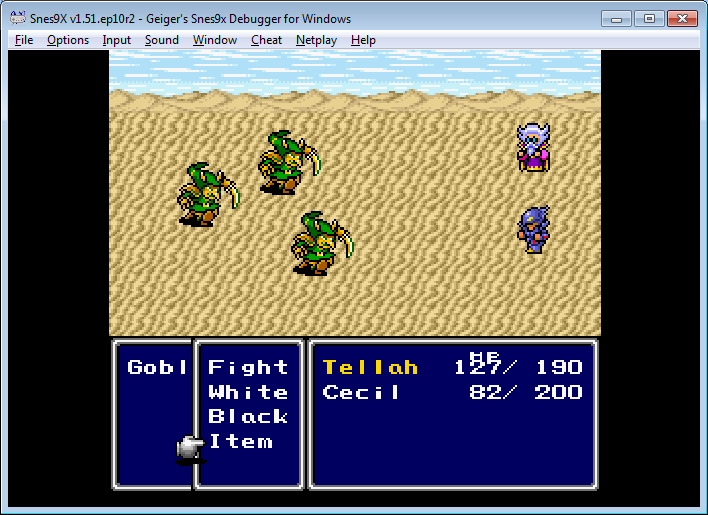
Here is the process in pictures, using Tellah as the example (which the eagle-eyed among you may have noticed was the example within the actual code above)

As can be seen here, Tellah has his normal set-up. White, Black, Recall
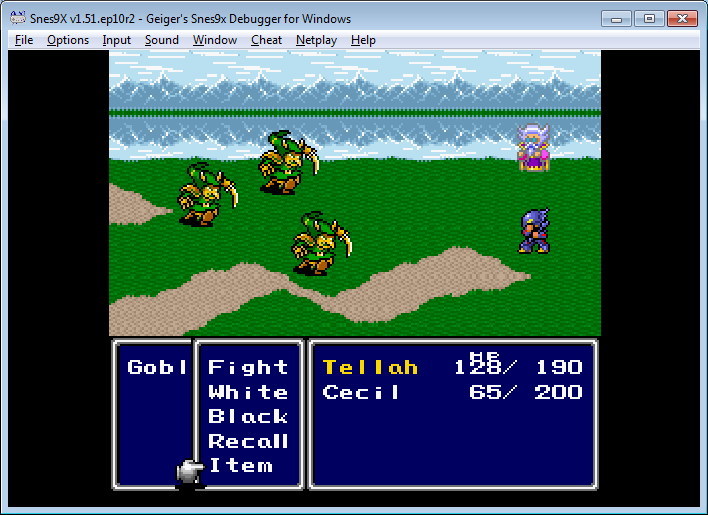

But with a little trip to our friendly Test Buddy Namingway...
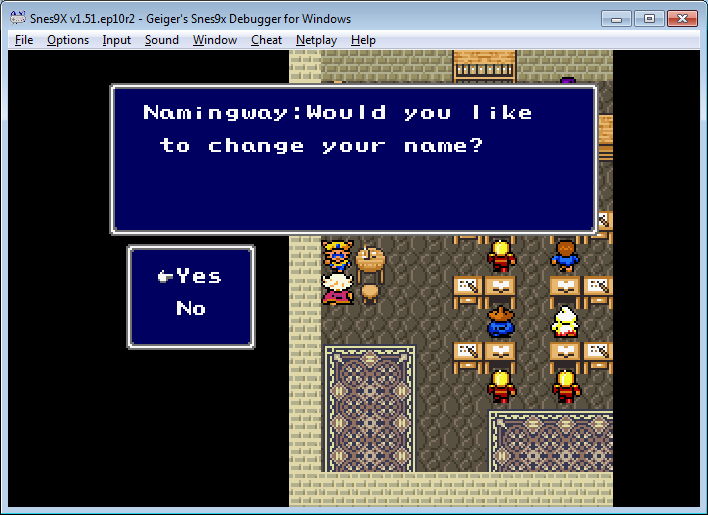


Tellah has forgotten Recall and Item has taken it's place! Take that original programmers of FFIV who used one of the Precious actor slots on getting rid of a single Command!


« Last Edit: March 22, 2015, 10:06:56 PM by Grimoire LD »