øAslickproductions.org/forum/index.php?PHPSESSID=5f0fck550j2m4m2fpbtkj2vkm1&action=profile;area=showposts;sa=topics;u=49e:/My Web Sites/Slick Productions - FFIV Message Board/slickproductions.org/forum/index48f3.htmlslickproductions.org/forum/index.php?PHPSESSID=5f0fck550j2m4m2fpbtkj2vkm1&action=profile;u=49e:/My Web Sites/Slick Productions - FFIV Message Board/slickproductions.org/forum/index48f3.html.zx¬`h^ÿÿÿÿÿÿÿÿÿÿÿÿÿÿÿÿÿÿÿÿÈ00WÍuOKtext/htmlISO-8859-1gzip0|ÖÍuÿÿÿÿÿÿÿÿWed, 11 Mar 2020 04:09:41 GMT0ó°° ®0®P®€§²ð®¬`h^…Íu Show Posts - samurai goroh

Show Posts

This section allows you to view all posts made by this member. Note that you can only see posts made in areas you currently have access to.


Topics - samurai goroh

Pages: 1
1
General Discussion / Final Fantasy weekend (50% off)
« on: August 10, 2017, 04:46:44 PM »
For anyone interested on the Steam versions of Final Fantasy, it seems that there is a offer going on for this weekend:
https://www.humblebundle.com/store/promo/final-fantasy-weekend/

2
Final Fantasy V Research & Development / FFV Randomizer - Grand Cross
« on: September 02, 2016, 09:26:24 PM »
A friend told me about a randomizer for this game (which is named as Grand Cross, just like Neo's random effect attack!).

Seems is really recent as it came out this week, you can find the repository here:
https://github.com/abyssonym/grand_cross

There's no new info we don't have, but I wanted to mention just in case anyone is interested in such projects.

3
It seems that FFV is coming for the PC. It's just the tablet version ported but I guess at least is something (I couldn't try the tablet version as I don't have a tablet in the first place, so I guess this will be the opportunity to play it)

If you want to get it, you can save 10% if you pre-order it (before September 24th):
http://store.steampowered.com/app/382890/

4
Final Fantasy V Research & Development / LUT @ C0/FEC0 used for RNG
« on: February 12, 2015, 12:07:47 PM »
There's a Lookup Table (LUT) located at C0/FEC0, which is used for RNG stuff, like random battle encounters. This table has the size of 256 & contains every number from 0x00 to 0xFF in a random setup.
Code: [Select]
07 B6 F0 1F 55 5B 37 E3 AE 4F B2 5E 99 F6 77 CB
60 8F 43 3E A7 4C 2D 88 C7 68 D7 D1 C2 F2 C1 DD
AA 93 16 F7 26 04 36 A1 46 4E 56 BE 6C 6E 80 D5
B5 8E A4 9E E7 CA CE 21 FF 0F D4 8C E6 D3 98 47
F4 0D 15 ED C4 E4 35 78 BA DA 27 61 AB B9 C3 7D
85 FC 95 6B 30 AD 86 20 8D CD 7E 9F E5 EF DB 59
EB 05 14 C9 24 2C A0 3C 44 69 40 71 64 3A 74 7C
84 13 94 9C 96 AC B4 BC 03 DE 54 DC C5 D8 0C B7
25 0B 01 1C 23 2B 33 3B 97 1B 62 2F B0 E0 73 CC
02 4A FE 9B A3 6D 19 38 75 BD 66 87 3F AF F3 FB
83 0A 12 1A 22 53 90 CF 7A 8B 52 5A 49 6A 72 28
58 8A BF 0E 06 A2 FD FA 41 65 D2 4D E2 5C 1D 45
1E 09 11 B3 5F 29 79 39 2E 2A 51 D9 5D A6 EA 31
81 89 10 67 F5 A9 42 82 70 9D 92 57 E1 3D F1 F9
EE 08 91 18 20 B1 A5 BB C6 48 50 9A D6 7F 7B E9
76 DF 32 6F 34 A8 D0 B8 63 C8 C0 EC 4B E8 17 F8

There are some references on a few files, but it was never brought up to discuss:
instructrtrepe - C2 Bank
Lenophis - Bank C0 disassembly

5
Final Fantasy V Research & Development / Bug: Butz' Blue Mage sprite
« on: August 11, 2009, 07:48:35 PM »
Here's the bug using the program:


It's done when you attack with your right hand (only with Butz as Blue Mage...)

Edit: Here's a snap with the bug in action...:

6
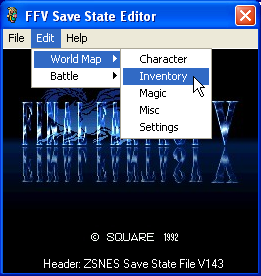
After quite a long time, I finally updated the save state editor (2.0.0). I removed a few things that I will add again later on (since I wanted to redo the program from scratch...). Still haven't tested it, so I might had messed it somewhere, but hope is functional :P
You can get the save state editor here...

This program was made with Visual Basic 6.0, so maybe you'll need some extra  files to open the program:

  • Microsoft Common Dialog Control 6.0 - COMDLG32.OCX
  • Microsoft Tabbed Dialog Control 6.0 - TABCTL32.OCX
  • Microsoft Windows Common Controls 6.0 (SP6) - MSCOMCTL.OCX

The program opens zsnes save state files & edits them. The program uses the names of the RPGe's v1.10 patch, although some names are slightly changed by myself because I liked them more, like Excailbur is named here as Excalipoor. Also, it might contain a few typos :P


Here's a brief description of what you can edit:


  • Characters: Lots of attributes to edit here, including equipment & commands
  • Inventory: Edit any item on the Inventory
  • Magic: Give yourself any magic (might had messed it again :P)
  • Misc: Misc codes that are to few to have an own section. I'd included the "Max" something thing here if it couln't apply else.
  • Settings: Pretty much the same settings window as in the game...


I'm thinking on maybe adding another feature for a list with the treasures that count for the percentage, but that would take a while to create...

Basically, I could do anything that appears on the codes I've made/found (I believe), so if you think it should have something else, you are welcomed to ask ;)

7
Final Fantasy V Research & Development / Jobs palette
« on: May 01, 2009, 12:31:55 AM »
Since there's no much info regarding the palette, I decided to create a post here.

First of all, the colors are stored in BGR (blue, green, red) using 2 bytes (16 bits), in which 5 bits is used per color and 1 extra which I don't know if it does something. The range for the color goes from 0 to 31, then you'll need to multiply that number by 8 to obtain the value in 256 colors.

Let's put an example: The palette for Butz' jobs starts at D4/A3C0 (no header). You'll see the numbers 06 22 (2206 hex) which can be converted to 0010001000000110 bin, then you separate it in 4 parts, as mentioned above:

msb: 0
b: 01000
g: 10000
r: 00110


You convert this number back to decimal, ignoring the first digit.

b: 8
g: 16
r: 6


Now, you multiply the result by 8, to get a 256 colors range:

b: 64
g: 128
r: 48


Using Tile Layer Pro, use this numbers as the first color of the palette & repeat the process 16 times to obtain & watch the palette in action ;)

Note: The offset of Butz' Job sprites starts at D2/0000 (no header)


Edit: Fixed the errors mentioned below :P

8
There was another post regarding an editor for FFV on the General Discussion & Support. I'm also working programming my editor & I'm open to suggestions on what to add or just what (or how) to improve my work. As mentioned on the link, I'm not good at programming & I accept any help :)

Seems that SentinalBlade will lend me a hand with the code & hopefully create a better editor, wish us luck :)


This program was made with Visual Basic 6.0, so maybe you'll need some extra  files to open the program:


Microsoft Common Dialog Control 6.0 - COMDLG32.OCX
Microsoft Tabbed Dialog Control 6.0 - TABCTL32.OCX
Microsoft Windows Common Controls 6.0 (SP6) - MSCOMCTL.OCX
Microsoft Flex Grid Control - msflxgrd.ocx


The program opens only smc ROMs. If you have the ROM zipped, please extract  it. I've tested the program with several versions (The original, plus some patches).  Thanks to Imzogelmo for the tip to detect if the game has a header, now there's no need to have a header to run the program :).

The program uses the names of the RPGe's v1.10 patch, although some names are slightly changed by myself because I liked them more, like Excailbur is named here as Excalipoor. Also, it might contain a few typos :P


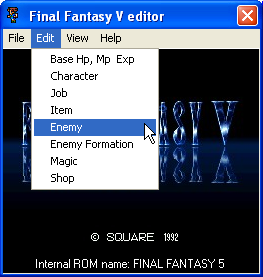
Here's a brief description of what you can edit:


Hp, Mp & Exp tables:

You can edit the base values of Hp, Mp when you level up (among with the exp. needed to level up).

Characters:

You can edit lots of properties, like the level, experience, Hp & Mp (among lots others). You can also change the equipment & commands. However, you should note that most of this fields will only be affected when you start a new game.

Jobs:

You can change their stats, what abilities they can learn (but not the amount of them...) & the commands they use. Now you can also change what they equip.

Items:

This is one of the parts that needs more information, I don't know what some of the fields work, so this section is far from being complete. However, you can edit a few properties I have already labeled, like the attack power & so.

Enemy:

Probably the most interesting part of the editor. You can change any status of the enemies (well, I still need to add the !Release effects...), the downside is that since there's a lot to edit, I wasn't able to put everything in a single window.

Enemy Formation:

It wouldn't be fun to edit a monster if you would have to play a lot to encounter that particular monster. Here, you can change the formation, the group formation & now also the zone formation.

Shops:

I'm having some problems updating the lists when you change the type of shop, but other than that, it works fine.

Magic:

Latest addition, you can now edit some Magic properties, such as MP consumed, target & attack type.


You can also view:

Enemy AI:
Currently you can only view the hex values of the enemy AI, so it's not really useful. Hope that in a future I'll make it friendly reader & make it editable...

Jobs Sprites:
Currently working on this. It used to be just a palette viewer for the jobs, but now I'm able to also load the images :D (Not sure if I'm missing a few poses & I think I misplaced 1 tile... )

Palette:
Kept the palette viewer, just for the kicks...

9
Final Fantasy V Research & Development / Monster Formation question
« on: May 03, 2008, 12:46:40 PM »
I have a question regarding the Monsters Formation...

If a monster address normally occupies 3 digits (from 000 to 16F), how can you distinguish the monster 000 (Goblin) from 100 (WingRaptor - 1st Form) & so on with only 1 byte?

Also, is there any more information with addresses 0, C, D, E & F?

Pages: 1