øAslickproductions.org/forum/index.php?PHPSESSID=5f0fck550j2m4m2fpbtkj2vkm1&topic=1204.msg12122e:/My Web Sites/Slick Productions - FFIV Message Board/slickproductions.org/forum/index829c.htmlslickproductions.org/forum/index.php?PHPSESSID=5f0fck550j2m4m2fpbtkj2vkm1&topic=1204.0e:/My Web Sites/Slick Productions - FFIV Message Board/slickproductions.org/forum/index829c.html.zx”ng^ÿÿÿÿÿÿÿÿÿÿÿÿÿÿÿÿÿÿÿÿÈ…¬8&OKtext/htmlISO-8859-1gzip8:Ö8&ÿÿÿÿÿÿÿÿTue, 10 Mar 2020 10:56:43 GMT0ó°° ®0®P®€§²ð®“ng^ÿÿÿÿÿÿÿÿì.8& Announcing: FF4Tools

Author Topic: Announcing: FF4Tools  (Read 11563 times)

Phoenix

  • FF4 Hacker
  • *
  • Posts: 456
    • View Profile
    • Phoenix Hacks
Announcing: FF4Tools
« on: September 01, 2009, 08:43:00 AM »
UPDATED (9/29/09): Version 1.1 released. Download here. There aren't any major changes, but the release notes are as follows:

Code: [Select]
- Replaced main page image hover resizing with quicker swap transitions
- Event Editor's hex guide is now shown by default, and has its own scrolling
- Made height of elements more consistent across the tools
- Fixed Phoenix Hacks logo not hiding behind other images
- Fixed favicon links
- Bug list and release notes are now included

-----------------------------------------------------------------
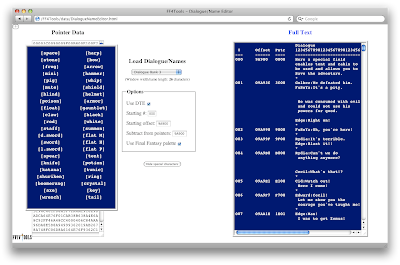
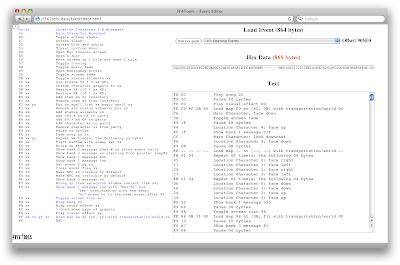
Finally, after weeks of work, I'm pleased to announce the first release of FF4Tools, a revamp of my three javascript tools for FF4 (formerly a text converter, an event scripter, and a location map creator). The new ones are much improved over the old ones, featuring the following changes:

Code: [Select]
- Tools updated to Dialogue/Name Editor, Event Editor, and Location Map Editor
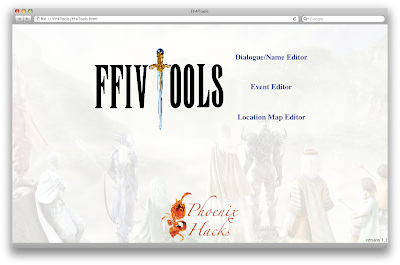
- Tools integrated together with an opening web page
- All tools now load their default data from text files (which can be edited)
- All tools display the hex data length, which turns red when the edited version exceed the space allotted for that item
- All tools have instructions, found by clicking the "?" in the top-left corner
- Dialogue/Name Editor and Event Editor are now a bit more stable for editing within the text boxes
- Dialogue/Name Editor now has a special characters panel that uses control codes (square brackets) rather than unicode character buttons
- Event Editor contains a hex guide to show the hex values
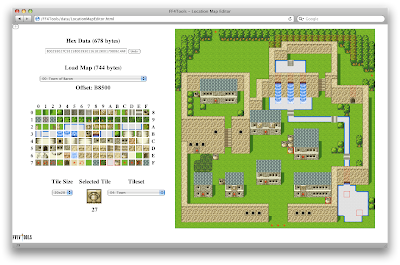
- Location Map Editor has been given a major overhaul, with resizeable tiles and maps now editable by point-and-click

I'm most proud of the Location Map Editor, which I think is now much more useful. I've been using it a bunch over the last few weeks to edit maps for my hack, and I find it pretty easy to use. Some tips on using it:
- Tiles can be selected from the grid or by right-clicking a tile already in the map
- Click and hold to change multiple tiles at once
- Undo works via the Undo button, Command-Z for Macs (i.e. Meta-Z), or Control-Z
- Current (x,y) location in the map is displayed in the browser's status bar

I've tested all the tools on Safari, Firefox, Opera, and IE. Most of the tools work in all of the browsers except IE (which has problems with all of them). As of now, there are the following bugs:

Code: [Select]
FF4TOOLS MAIN PAGE
Firefox
- Javascript image scaling can be a little jumpy sometimes

DIALOGUE/NAME EDITOR
All Browsers
- A window can’t be two blank lines

Firefox
- Editing after loading an entire dialogue bank is very slow
- Inserting a special character doesn’t put the cursor back where it’s supposed to go
- Hitting return when there’s lots of text will return the view (but not the cursor) to the top of the text

Opera
- Editing after loading an entire dialogue bank is very slow
- Inserting a special character doesn’t put the cursor back where it’s supposed to go
- Asterisks don’t stick, and hitting return removes all asterisks from the text

EVENT EDITOR
Opera
- The text data box is a little narrower than other browsers

LOCATION MAP EDITOR
Opera
- Right click doesn’t work (at least for me)

As you can see, Safari has the least amount of errors, while Opera has the most. The Dialogue/Name Editor is pretty unusable for Opera, and not very friendly for Firefox. So, sorry about that, but I've tried and haven't found a solution. I'm probably not going to rewrite it just to support those browsers. Since it's "open source" (in other words, HTML) if people really want the Dialogue/Name Editor to work in their browser they can fix it themself.

I'll be submitting it to RHDN once people here test it out and let me know if there's any major errors. I'll tried to test it extensively in the different browsers, but since I don't usually use them, I'm sure I've missed something. There is a download on my web page, but I haven't gotten to fixing the page itself (it's getting late, but I wanted to get this out tonight) so use the download link above. And now, for those that don't want to both downloading it, some pics:

(You can view full resolution versions here: http://picasaweb.google.com/phoenix.hacks/FF4Tools)


And now off to :sleep:


 :cycle:
« Last Edit: September 29, 2009, 08:08:12 AM by Phoenix »

Dragonsbrethren

  • Forum Overlord
  • *
  • Posts: 1,820
    • View Profile
    • Dragonsbrethren Industries
Re: Announcing: FF4Tools
« Reply #1 on: September 01, 2009, 10:01:32 AM »
I love you. :omg:

(I played around with the map editor a bit, unfortunately I can't really make use of it on this laptop, and will need to wait until I get my PC up and running again. But still, it's completely awesome. The other editors display fine at this resolution; the text editor is painfully slow here, though.)

 :edit:

Yes, I missed the tile size option... :blush:

 :edit:

Found a bug in Firefox: If you hold down the mouse button when drawing on a map, and exit the map boundary, the mouse will continue to draw if you reenter the map, even if you've released the button. You need to click again in the map to stop it. The undo button fixes any damage, at least.
« Last Edit: September 01, 2009, 11:14:37 AM by Dragonsbrethren »

JCE3000GT

  • Master of FF4
  • *
  • Posts: 1,429
  • Gender: Male
  • Vladof
    • View Profile
    • BlitzKrieg Innovations
Re: Announcing: FF4Tools
« Reply #2 on: September 01, 2009, 01:06:15 PM »
Too bad I use Opera.  :wtf:

Program looks good. 

Dragonsbrethren

  • Forum Overlord
  • *
  • Posts: 1,820
    • View Profile
    • Dragonsbrethren Industries
Re: Announcing: FF4Tools
« Reply #3 on: September 01, 2009, 03:05:08 PM »
This is worth installing another browser for, trust me. It doesn't sound like the event/map editor issues with Opera are that bad, anyway.

JCE3000GT

  • Master of FF4
  • *
  • Posts: 1,429
  • Gender: Male
  • Vladof
    • View Profile
    • BlitzKrieg Innovations
Re: Announcing: FF4Tools
« Reply #4 on: September 01, 2009, 03:12:51 PM »
This is worth installing another browser for, trust me. It doesn't sound like the event/map editor issues with Opera are that bad, anyway.

So how does the event editor actually work.   :laugh:

Phoenix

  • FF4 Hacker
  • *
  • Posts: 456
    • View Profile
    • Phoenix Hacks
Re: Announcing: FF4Tools
« Reply #5 on: September 01, 2009, 05:06:16 PM »
Too bad I use Opera.  :wtf:

It's only really unusable on Opera for the Dialogue/Name Editor, the other two should work pretty well. However, as Dragonsbrethren recommends, installing another browser (namely, Safari) is a good idea. I use Safari only with these tools, because it works so well. The javascript is much quicker in Safari (which really only affects large blocks of text in the Dialogue/Name Editor), you can keep it at a specific window size rather than be resizing your main browser windows, and there's only one or two bugs with it in all of the tools. (One of them is the same drawing-beyond-boundaries bug Dragonsbrethren found.) That's the Mac version of Safari, though -- I'm just assuming the Windows version will work the same.

So how does the event editor actually work.   :laugh:

All of the tools are cut and paste, unfortunately -- I would make it otherwise, but Javascript can only read files, not write to them. (If someone knows otherwise, please share! I spent hours looking online for a way to do it.) Basically you just type the hex codes and it translates it for you, but you can load the events from the game and edit them, then paste them back in at the offset it tells you to. This is how all the tools work, in essence.

By the way, I am planning on making it possible to read data from a ROM. I have it working on something else, I just need to create the code that references the right location within the ROM. I decided to save something for the next version, though, rather than spend time doing it before I released it.
 :lungs:

I.S.T.

  • i doesnt no how 2 blits
  • *
  • Posts: 482
  • Gender: Female
  • Global Moderator
    • View Profile
Re: Announcing: FF4Tools
« Reply #6 on: September 01, 2009, 10:48:32 PM »
How's it work on Chrome? It might have a better javascript engine, given it's webkit based...

Phoenix

  • FF4 Hacker
  • *
  • Posts: 456
    • View Profile
    • Phoenix Hacks
Re: Announcing: FF4Tools
« Reply #7 on: September 02, 2009, 01:05:14 AM »
I would have tested it on Chrome, but there's no good version for Mac.  :lame:  If someone would like it to test it out for me, I'd be most appreciative.

Dragonsbrethren

  • Forum Overlord
  • *
  • Posts: 1,820
    • View Profile
    • Dragonsbrethren Industries
Re: Announcing: FF4Tools
« Reply #8 on: September 02, 2009, 10:22:44 AM »
After using the map editor for a large part of yesterday, and not finding any more bugs, I have one feature suggestion: A way to quickly shift the map. Let's say I started drawing at the top left corner, but later realized I needed an extra tile or two on that side. I would need to redraw the entire map to get those two tiles available (or edit the data manually in hex, which is actually easier in this case). This is the only feature the editor is really missing, outside of maybe a way to quickly erase the existing map (which is just as easily done by blanking out the hex data box).

 :edit:

Also, have you considered adding sprite/event position editing to this? I'm not sure how hard it would be, but that's about the only thing (and header editing, which is already handled by JCE's ME) keeping this from being a fully-featured map editor.
« Last Edit: September 02, 2009, 12:49:27 PM by Dragonsbrethren »

Phoenix

  • FF4 Hacker
  • *
  • Posts: 456
    • View Profile
    • Phoenix Hacks
Re: Announcing: FF4Tools
« Reply #9 on: September 02, 2009, 04:53:05 PM »
By shift the map, do you mean just add in blank tiles in the top left corner? Or you mean adding columns? (Row would be easy, columns...not as easy.) Since erasing the map can be done by deleting the hex data, I probably won't add a button for it -- I'm trying to keep the interface uncluttered. You can also start with a blank one by selecting the "----Select a map-----" first option in the list.

I have considered adding sprite/event position editing; I'm impressed with what Zyrthofar's map viewer can do, and eventually I'd like it to be like that (minus the bugs), with editing capabilities. However, the way it is now (with tile images), I'm not sure how easy it would be to add. I'd have to overlay sprite/trigger images on the tile images, which is doable, but then having two (or three) layers to edit would make the interface quite a bit more complicated. (Not to mention, I'd have to figure out how to code it all in javascript.) I 'd like to keep it as simple as possible, at least for the time being, until I come up with a better way to display the options and such. Perhaps once I finish my FF4 hack, I'll spend some more time adding new features.

Also, what do you mean by header editing? Do you mean just adding headers to or subtracting from the whole ROM? I could add a checkbox that subtracts 0x200 if unchecked. (I'll probably do that anyway once I add the feature of loading from ROM data.)

Dragonsbrethren

  • Forum Overlord
  • *
  • Posts: 1,820
    • View Profile
    • Dragonsbrethren Industries
Re: Announcing: FF4Tools
« Reply #10 on: September 02, 2009, 05:29:49 PM »
No, not that header, this header. :yabin:

For shifting the map, I do mean adding/remove columns and rows, essentially. Say, move it one column right and three rows down, to make space to add a new area. It can be pretty annoying when you think you've left yourself enough room for everything, only to find you haven't and you don't have enough space to cram it in.

Phoenix

  • FF4 Hacker
  • *
  • Posts: 456
    • View Profile
    • Phoenix Hacks
Re: Announcing: FF4Tools
« Reply #11 on: September 03, 2009, 03:04:55 AM »
Ah, gotcha. I have those labeled as "location map properties", which is why I was confused.

I'll think on how to add/remove columns and rows. If the implementation won't take too much time I'll add it in, if not I might leave it for a later version.

Thanks for all the testing and suggestions.

Pinkpuff

  • Flan Princess
  • *
  • Posts: 924
  • Find a Megalixir in Unprecedented Crisis!
    • View Profile
Re: Announcing: FF4Tools
« Reply #12 on: September 03, 2009, 11:08:27 AM »
It looks messed up on mine... (see attached screenshot)
Let's dance!

Dragonsbrethren

  • Forum Overlord
  • *
  • Posts: 1,820
    • View Profile
    • Dragonsbrethren Industries
Re: Announcing: FF4Tools
« Reply #13 on: September 03, 2009, 11:33:06 AM »
That's the same problem I was having; the tiles are too big for your resolution. See the 20x20 pulldown menu? Switch that to 16x16 and you should be able to make use of it.

Phoenix

  • FF4 Hacker
  • *
  • Posts: 456
    • View Profile
    • Phoenix Hacks
Re: Announcing: FF4Tools
« Reply #14 on: September 03, 2009, 06:06:34 PM »
If you want to change the default size to something different, you can do it by changing the "selected" option in the list in the HTML. Search for:

<option value="12">12x12</option>
<option value="16">16x16</option>
<option value="20" selected="selected">20x20</option>
<option value="24">24x24</option>

Then change all instances of

='20'

to whatever size you want (='16' for example). There should only be four instances (height and width for the tileset tiles, and height and width for the map tiles).